
Auto captions
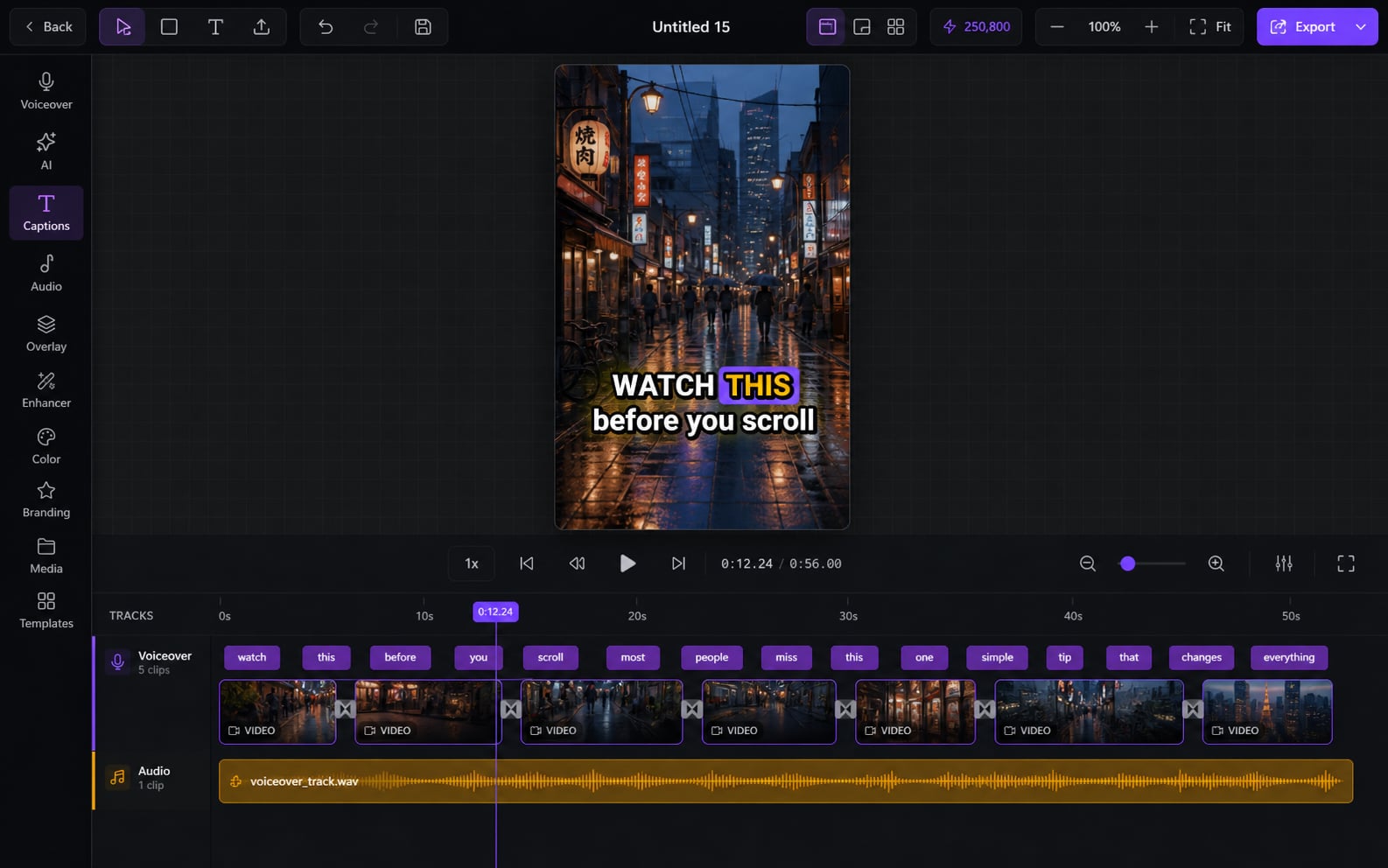
Most people watch on mute — so captions make or break the video. Clipmesh writes them, syncs every word, and styles them to stop the scroll.
From idea to a finished video
- 1
saves you 2 hours a day
Captions transcribe straight from your audio — automatically
- 2
Pick from 26+ animated, scroll-stopping styles
- 3
Tweak the wording, timing and look live in the preview
Scroll-stopping captions, written for you
Typing and timing captions by hand is soul-crushing — and flat, static captions get skipped. Clipmesh transcribes every word, syncs it to the frame, and animates it with 26+ styles you can tweak live.
Saves you 2 hours a day
26+ styles that stop the scroll
TikTok, MrBeast, Hormozi, Karaoke, Neon, Glitch, 3D Pop and more — the looks that actually hold attention, ready to drop in.
Every word, perfectly timed
No hand-syncing — each word is timestamped and highlighted on the exact frame it's spoken.
Bold Drop
Make the type yours
Font, size, weight, spacing, caps and alignment — dial captions to match your brand, not a locked preset.
Effects that pop over any footage
Outline, drop shadow, 3D extrude, glow, glitch and gradient fills keep words readable on busy backgrounds.
Highlight the active word
Color, box, scale-pop, glow or a cycling palette on the word being spoken — the trick that keeps eyes locked.
Saves you 2 hours
Fix it live, no re-render
Spot a typo or off-timing? Edit right in the preview and see it change instantly.
Your fonts, built in
Use your own brand fonts or Google Fonts — cached on your machine, ready to go.
More in the editor
See allMulti-track timeline
Most faceless tools trap you in rigid templates. Here you get a real timeline — arrange, trim and layer everything exactly how you want.
AI footage match
Hunting for b-roll is the worst part of faceless video. The AI director does it for you — a fitting shot for every line, dropped on the timeline.
Media library
Re-uploading the same clips and digging through folders every project? Upload once — Clipmesh tags it and keeps it ready in every project.
Semantic clip search
Can't remember which clip had the shot you need? Just describe it — Clipmesh finds it in your library by what's in it, not its filename.
Overlays & stickers
Plain footage scrolls right past. Layer logos, lower-thirds, emojis and animated stickers on top to add the personality that holds attention.
Voiceover
No mic, no problem — and no jumping between apps. Generate a lifelike voiceover or drop in your own, right inside the editor.



Download Clipmesh Now
Turn any idea into a post-ready faceless video — free, on your own machine.